Tuesday, April 10, 2018

Auro IM100 and Autel MS906TS which is better for TPMS?

Q1:
Anyone know how good the tpms function is on the Auro OtoSys IM100?? how does it compare to the tpms functionality of the Maxisys ms906ts?

A1:

No comparison between the two. The Autel MS906TS is a full function TPMS tool. The 906TS can activate the sensors and get the pressure, temp, battery life, and Sensor ID. The 906TS can also do all of the relearn functions for the TPMS system including writing the IDs to the PCM. The only functions the IM100 and IM600 have is the ability to write the sensor IDs to the vehicle. You will still need a TPMS activation tool to activate the sensors and retrieve the IDs. You can purchase a TS408 for that function but you would then have to type in the sensor IDs into the IM tool while attached to the vehicle.


Q2:
Does the im100 cover a lot more vehicles/pin codes than the ms906bt/ts as far as key programming is concerned?

A2:
Yes, much more. The Maxisys tools have limited key coverage, but also the OtoSys IM100 gives you the ability to read keys, read EEPROMs and more lost key functionality.

Thursday, April 5, 2018

Auro OtoSys IM100 IM600 Program 2018 Nissan Altima Smart Key

Here's the guide of Auro OtoSys IM100 programming a 2018 Nissan Altima 5-button Smart Key bypassing the security. This functionality is available on the both IM100 and the OtoSys IM600.

Connect IM100/IM600 tablet with vehicle
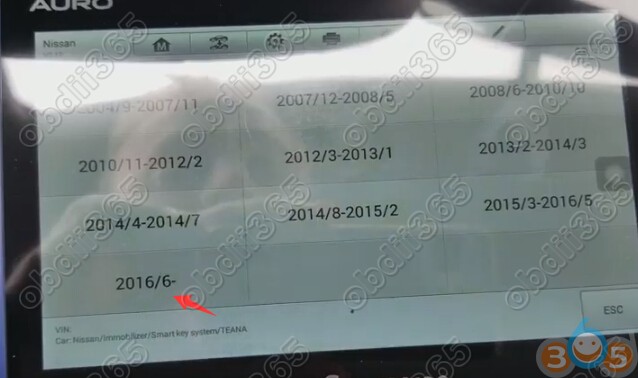
Select IMMO function->Nissan->Immobilizer smart key programming->TEANA->2016/06 up
auro-im100-2018-nissan-altima-1
auro-im100-2018-nissan-altima-2
auro-im100-2018-nissan-altima-3
auro-im100-2018-nissan-altima-4
Establish communication
Scanning vehicle system
Select Immobilizer information registration->Register key

Set the vehicle to the following status, and then press OK
-Ignition switch or power switch: LOCK
-Hazard switch: ON (For preventing BCM from entering into CAN cummunication sleep)
-P(A/T) or neutral (M/T)
-Battery voltage: More than 12.5V
-Steering: Not in fully locked
auro-im100-2018-nissan-altima-5

Operate according to the following procedure:
auro-im100-2018-nissan-altima-6

1.Key switch blinks for 5 seconds. Touch the i-Key to key switch while key switch is blinking. A buzzer in the combination meter sounds twice when I-Key is recognized by the vehicle.

Caution: Antenna is installed in upper part (logo side) of I-Key. Touch logo of the l-Key the center of the key switch.  Touch [Next] when preparation is complete.

Operate according to the following procedure:
auro-im100-2018-nissan-altima-7

1:Without depressing the brake, press the ignition switch continuously for 2 or more seconds until the power switch turns ON.
2:Ignition switch changes from LOCK to ON.
auro-im100-2018-nissan-altima-8
auro-im100-2018-nissan-altima-9

http://www.obdii365.com/

Auro OtoSys IM100 and IM600 Tablet Update Guide

Here’s a quick review of what an update looks like on the Auro Diag Otosys IM100 and IM600diagnostic & key programmers. Very easy to do over wifi.

The Update application allows you to download the latest released software.
The updates can improve the OtoSys applications’ capabilities, typically by adding new tests, new models, or enhanced applications to the database.

*Auro OtoSys Programmers enjoy One Year Free Update.  You need extra subscription per year after that (price is unknown currently).

The Display Tablet automatically searches for available updates for all of the OtoSys software when it is connected to the Internet. Any updates that are found can be downloaded and installed on the device.
update-im100-im600-1
To update the diagnostic software and programming software:
1. Make sure the Display Tablet is connected to a power source with stable access to the Internet/WiFi.
2. Tap the Update application button from the OtoSys Job Menu; or tap the update notification message when received one; or tap the
Update icon on Vehicle Menu in Diagnostics application. The Update application screen displays.
update-im100-im600-2

3. Check all available updates:
 If you decide to update all the items of IMMO software, select IMMO Tab and then tap the Update All button; if you want to
update all items of diagnostic software, select Diagnose Tab and then tap the Update All button.
 If you only want to update one or some of the item(s), tap the Update button on the right column of the specific item(s).
4. Tap the Pause button to suspend the updating process. Tap Continue to resume the update and the process will continue from
the pause point.
5. When the updating process is completed, the firmware will be installed automatically. The new version will replace the older version.
update-im100-im600-3
update-im100-im600-4
Auro OtoSys IM100 Update Log till now:
New Release on 2018/03/20
IM100 Jaguar Land rover software update to V2.22
Ineternational models:
Jaguar:
1.Added F-type 2014-2015 function: Add smart key, all smart keys lost, recover smart key
2.Added XF 2013-2015 function: Add smart key, all smart keys lost, recover smart key
3.Added XJ 2013-2015 function: Add smart key, all smart keys lost, recover smart key
4.Added a manual remote relearn method (For model SOVERIGN,S-type, XJ 2003-2007, XJR,X-Type machinery key)
Land rover:
1.Added Discovery4 2013-2014 function: Add smart key, all smart keys lost, recover smart key
2.Added Range Rover 2014-2015 function: Add smart key, all smart keys lost, recover smart key
3.Added Range Rover Evoque function: Add smart key, all smart keys lost, recover smart key
4.Added Range Rover Sport 2014-2015 function: Add smart key, all smart keys lost, recover smart key
Volvo
1.Optimized the procedure of Semi-smart keys lost, add semi-smart key on the version v2.21
1.Add V40 2012-2017 function: semi-smart keys lost, add semi-smart key
Mitsubishi:
1.Optimized the procedure of Outlander 2008-2012 machinery key immobilizer
2.Optimized the procedure of Outlander 2013- smart key immobilizer
3.Optimized the procedure of Outlander -2010 machinery key immobilizer
Chrysler:
1.Optimized the procedure of Dodge Caravan 2010-2014 machinery key immobilizer
2.Optimized the procedure of Chrysler 300C 2011- machinery key immobilizer
3.Added Dodge Challenger 2015- smart key proximity-system
Nissan:
1.Optimized the procedure of ECU_SteeringWheel on the existed menu
IM100 software release V2.0 (2018/03/02)
New:
1. 2018 models supported
2. Three addtional models supported, i.e Europe Pajero sport/Montero sport
(KR#,KS#), Australia Pajero sport and North America Mirage G4
3. Five additional systems supported, i.e BSW, BSW (sub), e-Call, Electric Heater and FCM/LDW/AHB
4. Freeze frame function added to the Read Code function
IM100 Released Update  (2018/02/24)
BMW MINI Version V1.05
BMW
1.Add Read ISN function via OBD for 5 engines (MEVD1724(N20),EVD1725(N13),MEVD172Y(N55),S63TU(S63TU),N63TU(N63TU)) under F chassis
2.Add Calculation Parameter Flash function (supporting ECU replacement function by enter VIN, vehicle Frequency and Engine ISN) under
FEM/BDC Parameter Flash function and adds support for replacement of second-hand modules and new modules.
Mini
1.Add Read ISN function via OBD for 5 engines (MEVD1724(N20),EVD1725(N13),MEVD172Y(N55),S63TU(S63TU),N63TU(N63TU)) under F chassis
2.Add Calculation Parameter Flash function (supporting ECU replacement function by enter VIN, vehicle Frequency and Engine ISN) under
FEM/BDC Parameter Flash function and adds support for replacement of second-hand modules and new modules.
VW,Audi,Bentley,Skoda, Seat V2.10
1.Add following functions in K-line instruments of Audi A4 2004-2008 Bosch RB8 encrypted version in Expert mode: EEPROM Backup, Restore EEPROM,
Repair Vehicle Start-up issue, Reset Instrument.
2.Add Vehicle Data Backup function in K-line instruments of Audi A4 2004-2008 Bosch RB8 encrypted version in Smart mode
3.Optimizes immobilizer-related functions for 2008-2013 Lavida.

Auro OtoSys IM600 Update Log till now:
IM600 Hyundai Kia software Update to V7.30 (2018-02-26)
KIA
New:
1. Diagnostic support for more 2017 and 2018 models, including CERATO/FORTE(YDm),
RIO (FB), Stinger (CK), PICANTO/MORNING(JA), etc
2. More functions avaliable, including Read Codes, Erase Codes, Live Data, Atcivte Test, ECU information and Special functions
3.Five special functions added, including CLU variant coding (manual), Learning after replacing the Turbocharger actuator, battery discharge
warning history check, longitudinal G sensor calibration (ESC only) and HPCU (MCU,GCU) diagnosis parameter
initialization
Hyundai:
FIX: Some VIN decoding failures
Service_Hyundai
FIX: Some VIN decoding failures
Service_KIA
FIX: Some VIN decoding failures
IM600 VAG Audi Skoda Seat Software update to V2.10 (2018-02-24)
VW
1.Adds follwing functions in K-line instruments of audi A4 2204-2008 Bosch RB8
encrypted version in Expert Mode: EEPROM Backup, Restore EEPROM, Repair vehicle start up issue, Reset instrument
2. Adds vehicle data backup function in K-line instruments of Audi 2004-2008  Bosch RB8
encrypted version in Smart Mode.
3.Optimizes immobilizer related functions for 2008-2013 Lavida

Tuesday, April 3, 2018

Reprogramming Honda CR-V 2015 Acceleration Body with AURO OTOSYS IM600

How to: Reprogram Honda CR-V 2015 acceleration body by using Auro OtoSys IM600 tablet diagnostic and programming system.

Select Programming->Honda->Diagnostic->Auto Scan, IM600 will read VIN, select control module: Engine
im600-honda-crv-acceleration-body-1
im600-honda-crv-acceleration-body-2
im600-honda-crv-acceleration-body-3
im600-honda-crv-acceleration-body-4

Diagnostic system initializing

Select Special Function->TP Position check
im600-honda-crv-acceleration-body-5
im600-honda-crv-acceleration-body-6
Honda software will reset the TP learning value
Need to clean the throttle body at the same time if reset the TP learning value
im600-honda-crv-acceleration-body-7
TP learning value has been cleared.
Clean the throttle body.
im600-honda-crv-acceleration-body-8

Do the idle learn procedure when the engine speed is unstable.

1. Make sure all electrical items (A/C,audio, rear window defogger, lights etc) are off.
2.Turn the ignition switch on, wait for 2 seconds
3.Start the engine and hold it at 3000 rpm with no load (in Park or neutral) until the radiator fan comes on or until the engine coolant temperature reaches 90 degree
4. Let the engine idle for a minimum of 5 minutes with no load.

Note: if the radiator fan from running. Don;t count its running time for 5 minutes.
im600-honda-crv-acceleration-body-9
Success.


Note: If you need IM600, please contact our customer service online: Email: Sales@OBDII365.com

Skype: OBDII365.com

Monday, April 2, 2018

Auro OtoSys IM600 Read and Unlock Megamos 48 Chip

Auro Otosys IM600 tablet and up400 adapter reading and unlocking Megamos 48 transponder guide is provided below:


Insert Megamos 48 Chip into UP400 adapter
auro-im600-Megamos-48-unlock-1

Select Programming function->Key read & write->Automotive Detection

auro-im600-Megamos-48-unlock-2

auro-im600-Megamos-48-unlock-3

IM600 read key type: Megamos 48

auro-im600-Megamos-48-unlock-4

Select Lock Check

auro-im600-Megamos-48-unlock-5

The Megamos 48 Chip is locked

auro-im600-Megamos-48-unlock-6

Go back to Function menu, select Other functions->Key unlock->Megamos 48

auro-im600-Megamos-48-unlock-7

auro-im600-Megamos-48-unlock-8
auro-im600-Megamos-48-unlock-9

Megamos 48 transponder chip unlocked successfully.

auro-im600-Megamos-48-unlock-10

Check the chip status: Unlocked

auro-im600-Megamos-48-unlock-11

Done.

Note: If you need IM600, please contact our customer service online: Email: Sales@OBDII365.com
Skype: OBDII365.com

Auro OtoSys IM100 New Release on March, 30th, 2018

New updates on the Auro OtoSys IM100 tablet diagnostic and programming tool! (30/03/2018).

IM100 Jaguar Land rover software update to V2.22
Release date: 2018/03/20

International models:

Jaguar:
1.Added F-type 2014-2015 function: Add smart key, all smart keys lost, recover smart key
2.Added XF 2013-2015 function: Add smart key, all smart keys lost, recover smart key
3.Added XJ 2013-2015 function: Add smart key, all smart keys lost, recover smart key
4.Added a manual remote relearn method (For model SOVERIGN,S-type, XJ 2003-2007, XJR,X-Type machinery key)

Land rover:
1.Added Discovery4 2013-2014 function: Add smart key, all smart keys lost, recover smart key
2.Added Range Rover 2014-2015 function: Add smart key, all smart keys lost, recover smart key


Mitsubishi:
1.Optimized the procedure of Outlander 2008-2012 machinery key immobilizer
2.Optimized the procedure of Outlander 2013- smart key immobilizer
3.Optimized the procedure of Outlander -2010 machinery key immobilizer

Chrysler:
1.Optimized the procedure of Dodge Caravan 2010-2014 machinery key immobilizer
2.Optimized the procedure of Chrysler 300C 2011- machinery key immobilizer
3.Added Dodge Challenger 2015- smart key proximity-system 


Nissan:
1.Optimized the procedure of ECU_SteeringWheel on the existed menu

auro-im100-march-2018-update-1

auro-im100-march-2018-update-2

Sunday, April 1, 2018

Read EEPROM ST95040 with Auro OtoSys IM600 and UP400

Auro OtoSys IM600 is a diagnostic, key programming and ecu coding 3-in-1 tools. Here's a real test report on reading EEPROM ST95040 together UP400 eeprom adapter.

Remove ecu
Connect IM600 with UP400 adapter and computer
Select Programming->Chip Read & Write->EEPROM->ST->M95XXXX->M95040->View Diagram
auro-im600-EEPROM-ST95040-1

auro-im600-EEPROM-ST95040-2

auro-im600-EEPROM-ST95040-3

auro-im600-EEPROM-ST95040-4

auro-im600-EEPROM-ST95040-5

auro-im600-EEPROM-ST95040-6

auro-im600-EEPROM-ST95040-7

OtoSys IM600 will show you identification for direction of eeprom chip, which adapter and how to connect etc
Follow wiring diagram to connect UP400 adapter with eeprom
auro-im600-EEPROM-ST95040-8
auro-im600-EEPROM-ST95040-9

auro-im600-EEPROM-ST95040-10
 Select Read Operation
If Auro IM600 prompts no chip response, you can
1.check whether the chip is connected
2.check whether the chip type is correct
3.check whether the chip is placed correctly or in good contact.
auro-im600-EEPROM-ST95040-11
 If all okay, IM600 will read eeprom  ST 95040 chip data
auro-im600-EEPROM-ST95040-12
Save eeprom data.


Note: If you need IM600, please contact our customer service online: Email: Sales@OBDII365.com
Skype: OBDII365.com