Showing posts with label Autel JVCI. Show all posts

Sunday, June 21, 2026

How to Solve GM SPS2 ‘VTD Secure Access Locked’ Error?

Problem:

Tried to program a Honda Prologue 2025 (it is the same as GM Blazer EV) all keys lost using Autel V200 and Techline Connect SPS2. Got 30 mins countdown and finally gets ‘VTD secure access locked ‘ message. Tired Autel JVCI+ and VCI200, all the same.

GM SPS2 ‘VTD Secure Access Locked’  1

GM SPS2 ‘VTD Secure Access Locked’  2

Solution:

The “VTD Secure Access Locked” error during a GM SPS2 / Techline Connect session usually indicates a security lockout, programming timeout, or a communication failure with GM’s servers. The vehicle’s computer has temporarily frozen the theft-deterrent handshake.


How to resolve the error?

1. Isolate the Fobs
Try again, making sure the programmed key is outside the car. Make sure any existing, programmed key fobs are entirely outside the vehicle during the setup to avoid communication interference.

2. Perform a Hard System Reboot
If the software stalls, you must fully reset the network.
Unplug the vehicle’s battery for at least 10–15 minutes.
Completely shut down and restart your laptop.
Unplug and reconnect your Pass-Thru device (e.g., Autel V200).


3. Follow the “Door Dance” Carefully

When the software asks to initiate the 10-minute (or 10:30) VTD relearn timer, exact sequence matters:

With all doors closed and the laptop set up so you can see it from outside the vehicle, prepare to click next.
Roll the driver’s window down so you can operate the computer while standing outside.
Wait for the countdown. If you see the lock error at the end of the timer, disconnect your VCI, start the steps over, and retry.


Some other solutions:

1). Unplug the VCI and plug it back in. Reconnect and it works. Close out of everything, dump your cache data, reboot your pc and try again!

2). Change network connection. Sometimes the internet is too slow and will also have this problem.

2). Unplug the VCI and update the BCM.  Disconnect and reconnect everything, then choose BCM from the module list and your gonna update, there isn’t an “update” labeled area to click on so you would be programming the module and that will “update” it and it should remove the vtd secure access and lower the timer to 10mins, remember when you update the BCM you have to disconnect and relogin to sps2 and rerun it freshly with the updated BCM in order for it to work correctly.

Friday, October 17, 2025

Autel J2534 vs Topdon Rlink J2534

 Autel MaxiFlash J2534 vs Topdon Rlink J2534 which to buy? Is the compatibility similar?


The Autel MaxiFlash J2534 (also Maxiflash JVCI) and the Topdon RLink J2534 are both SAE J2534-compliant pass-thru devices designed for OEM-level vehicle diagnostics, ECU reprogramming, and coding. They enable technicians to interface with manufacturer-specific software (e.g., Toyota Techstream, Honda iHDS) via a PC, supporting tasks like module updates and fault repairs. Neither includes OE software subscriptions, which must be purchased separately from the vehicle makers.

Key differences lie in ecosystem integration, connectivity, price, and brand-specific optimizations. The Autel is more tightly integrated with Autel’s diagnostic scanners, making it ideal for users already in the Autel ecosystem. The Topdon is more affordable and offers a streamlined driver management system for broader OEM compatibility, appealing to budget-conscious independents. Both support modern protocols like CAN FD and DoIP, but real-world performance can vary by software.


Comparison Table

Feature/Specification
autel jvci j2534
topdon rlink j2534
Compliance Standards
SAE J2534-1 & J2534-2, D-PDU, RP1210, CAN FD, DoIP
SAE J2534, D-PDU, RP1210, CAN FD, DoIP
Connectivity
Bluetooth wireless, USB, Ethernet; built-in WiFi antenna for advanced networking
Wired USB Type-C only (no wireless); stable but less flexible
Operating System Support
Windows (PC-based); seamless with Autel MaxiSys tablets (e.g., Elite II, MS909)
Windows 7/8/10/11 (64-bit PC only); no tablet integration
Vehicle/OEM Coverage
Broad: Toyota Techstream, Volvo VIDA, Honda HDS, Jaguar-Land Rover IDS, BMW 3G; all makes/models with OE software
17+ brands (e.g., Ford IDS, Nissan Consult, BMW ISTA, Mercedes Xentry); focuses on 13+ core brands
Key Features
– Fast reprogramming for newest controllers
– Data storage & internet updates
– Oscilloscope/multimeter in VCMI variant
– Direct BMW/Benz ECU programming with Autel scanners
– DMS (Driver Management System) for one-click driver installs/updates via RLink Platform
– Compact/lightweight design
– High-speed wired data transfer
– Responsive tech support
Power Supply
AC/DC adapter (12V); vehicle-powered via OBD-II
AC/DC adapter; vehicle-powered via OBD-II
Dimensions/Portability
Compact VCI form factor; portable with cables included
Pocket-sized (lightweight, fits in toolbox); includes zippered case
Price (Approximate, USD)
$800–$1,000 (varies by retailer; higher for bundles with scanners)
$299 (more affordable entry point)
Pros
– Proven reliability in Autel ecosystem
– Wireless flexibility
– Extensive Autel-specific programming (e.g., BMW/Benz)
– Cost-effective
– Easy setup with RLink Platform
– Broad OEM driver access
– Stable wired performance
Cons
– Higher cost
– Requires binding SN for some older models (newer versions simplified)
– Dependent on Autel for full potential
-need the subscription for Autel tablet
– No wireless option
– Potential driver conflicts (e.g., with GM GDS2 or other J2534 tools)
– Limited to PC (no scanner integration)
Best For
Professional shops using Autel tools; high-volume BMW/Benz/Toyota work
Independent technicians seeking value; multi-brand OE programming on a budget


Detailed Differences
1. Integration and Ecosystem: 

The Autel shines in hybrid use—pair it with an Autel MaxiSys scanner for direct ECU programming on select vehicles (e.g., Mercedes-Benz and BMW without a PC). The Topdon is PC-centric, relying on its RLink Platform for driver management, which simplifies installing/updating software for brands like Ford or Porsche but lacks scanner synergy.

2. Connectivity and Speed:
Autel’s Bluetooth enables wireless freedom, reducing cable clutter in busy shops. Topdon’s wired USB prioritizes stability and low latency, which is preferable for long programming sessions but limits mobility.

3. Ease of Use and Setup:
Topdon edges out with one-click driver downloads via its platform, ideal for quick OEM switches. Autel requires initial driver installation from CD/USB and occasional firmware updates, but it’s straightforward for experienced users.

4. Performance and Reliability:
Both handle core J2534 tasks reliably, but user feedback highlights Autel’s faster reprogramming speeds for complex jobs. Topdon is praised for affordability and support but may need workarounds for GM tools (e.g., uninstalling conflicting drivers).

5. Value and Support:
At under $300, the Topdon offers better entry-level value for occasional use. Autel’s premium price reflects its brand reputation and extras like waveform tools in advanced variants. Both provide lifetime support, but Topdon’s is noted for quicker responses.

If you’re in the Autel ecosystem or need wireless features, go with the Autel J2534. For cost savings and easy multi-OEM access, the RLink J2534 is a strong contender. Always verify compatibility with your specific OE software and vehicle models before purchase.

Wednesday, July 9, 2025

Autel MaxiFlash JVCI+ vs Topdon Rlink Lite J2534

 Below is a detailed comparison of the Topdon RLink Lite and Autel MaxiFlash JVCI+ J2534 devices

Comparison: Topdon RLink Lite vs. Autel MaxiFlash JVCI+ J2534 
FeatureTopdon RLink LiteAutel MaxiFlash JVCI+
PurposeJ2534 Pass-Thru Programmer and VCI for OE-level diagnostics, programming, and codingJ2534 Pass-Thru Programmer and VCI for OE-level diagnostics and programming
Supported ProtocolsD-PDU, J2534, RP1210, DoIP, CAN, CAN FD, J1850, K-LineJ2534-1, J2534-2, CAN FD, DoIP, ISO 9141, ISO 14230, ISO 15765, SAE J1850, K-Line
Vehicle Coverage13+ brands including GM, Ford, Nissan, BMW, Mercedes-Benz, VAG, Porsche, Toyota, Honda, Subaru, Chrysler, Wuling, VolvoBroad coverage including BMW, Mercedes-Benz, VAG, GM, Ford, Toyota, Honda, Nissan, and more
OE Software CompatibilitySupports OEM software for diagnostics, programming, and coding (e.g., ODIS, Xentry, ISTA, Techstream, GDS2)Compatible with OEM software for diagnostics and programming (e.g., Techstream, GDS2, FDRS, ODIS)
Remote diagnosisYes, new feature in 2025. Supports B/C mode remote diagnosisNo
Display5-inch LCD touchscreen for user-friendly interfaceNo display; relies on PC or Autel tablet for interface
Operating SystemAndroid 11.0 for standalone operationNone; operates as a pass-thru device connected to a Windows PC or Autel tablet
Processor and Storage1.8 GHz quad-core, 2GB RAM, 32GB ROMNot specified; optimized for pass-thru communication
ConnectivityUSB, Wi-Fi, EthernetUSB, Wi-Fi, Bluetooth
Driver ManagementProprietary DMS (Driver Management System) with one-click driver downloadsAutel Maxi PC Suite for driver management
Special FeaturesBuilt-in battery, relays key status for VAG/Nissan, rugged designCompact design, 4 CAN channels, works with Autel tablets (e.g., MaxiSys series)
Price~$899 (with 13 brand license)~$325
Software IncludedNo OE software; requires separate OEM subscriptionsNo OE software; requires separate OEM subscriptions
Target AudienceProfessional technicians, repair shops, educatorsProfessional technicians, repair shops, Autel ecosystem users
CAN FD/DoIP SupportYes, supports modern vehicle protocolsYes, supports modern vehicle protocols
Warranty and SupportLifetime technical support from TOPDONSupport through Autel’s network, often tied to tablet subscriptions
In the world of automotive diagnostics and programming, J2534 pass-thru devices are indispensable tools for professional technicians and repair shops aiming to perform OE-level diagnostics, ECU programming, and coding. Two popular options in this space are the Topdon RLink Lite and the Autel MaxiFlash JVCI+. Both devices offer robust capabilities for interfacing with OEM software, but they differ in design, features, and user experience. In this article, we’ll explore the key differences between these two devices to help you decide which is best suited for your needs.
Overview of the Devices
Topdon RLink Lite:
The RLink Lite is a versatile J2534 pass-thru programmer and vehicle communication interface (VCI) designed for professional technicians, repair shops, and educators. It stands out with its 5-inch LCD touchscreen, Android 11.0 operating system, and support for modern protocols like CAN FD and DoIP. It’s marketed as a cost-effective alternative to OEM diagnostic tools, capable of replacing devices like the Mercedes-Benz C4/C6, BMW ICOM, and VAG VAS6154/5054.  Remote Diagnostics is now live on RLink Lite! With this powerful feature, you can now: Provide remote support without being onsite, Expand your service capabilities instantly and Save time, boost efficiency, and grow your business.

Autel MaxiFlash JVCI+:

The MaxiFlash JVCI+ is a compact J2534 pass-thru device from Autel, a well-established name in automotive diagnostics. Designed to work seamlessly with Autel’s diagnostic tablets (e.g., MaxiSys series) or Windows PCs, it supports a wide range of OEM software for programming and diagnostics. It is benefits from Autel’s reputation for reliability and integration within its ecosystem.

Key Differences

  1. Design and User Interface
    The Topdon RLink Lite features a 5-inch LCD touchscreen and runs on Android 11.0, allowing for standalone operation and a user-friendly interface. This makes it more intuitive for technicians who prefer a device with built-in controls rather than relying entirely on a PC. It also includes a built-in battery, enabling remote diagnostics without constant power supply.

    In contrast, the Autel MaxiFlash JVCI+ is a compact, display-less device that relies on a connected PC or Autel tablet for operation. Its design prioritizes portability and integration with Autel’s ecosystem, making it ideal for users already invested in Autel tools. However, it lacks the standalone functionality of the RLink Lite.

  2. Protocol and Vehicle Coverage
    Both devices support modern protocols like CAN FD and DoIP, ensuring compatibility with newer vehicle models. They are compliant with J2534 standards (RLink Lite also supports D-PDU and RP1210), making them versatile for OEM software like Toyota Techstream, GM GDS2, Ford FDRS, and VAG ODIS. 
    The RLink Lite boasts compatibility with 13+ brands, including GM, Ford, Nissan, BMW, Mercedes-Benz, VAG, Porsche, Toyota, Honda, Subaru, Chrysler, Wuling, and Volvo. It also offers specialized functions like relaying key status for VAG and Nissan security features.

    The JVCI+ supports a similarly broad range of brands, with a focus on integration with Autel’s diagnostic tablets. It includes four CAN channels for enhanced communication and has been tested with software like PCMFlash, SPS, FDRS, and ODIS. While both devices offer extensive vehicle coverage, the RLink Lite’s explicit support for additional protocols (D-PDU, RP1210) may give it an edge for certain European vehicles.

  3. Driver Management and Software
    The RLink Lite features TOPDON’s proprietary Driver Management System (DMS), which simplifies driver installation and updates with one-click functionality. This system integrates seamlessly with OEM software and includes built-in operation guides, making it easier for technicians to navigate complex OE software.

    The JVCI+ uses Autel’s Maxi PC Suite for driver management, which is straightforward but less feature-rich compared to the RLink Lite’s DMS. Autel users benefit from tighter integration with Autel tablets, which may streamline workflows for those already using tools like the MaxiSys Ultra or MS909.

    Both devices require separate OEM software subscriptions, and neither includes OE software out of the box. Security-related functions (e.g., immobilizer programming) are locked by NASTF credentials, as mandated by OEMs.

  4. Connectivity and Performance
    The RLink Lite supports USB, Wi-Fi, and Ethernet connections, offering flexibility for remote diagnostics and high-speed data transfer via DoIP. Its 1.8 GHz quad-core processor, 2GB RAM, and 32GB ROM ensure smooth operation and ample storage for drivers and apps.

    The JVCI+ supports USB, Wi-Fi, and Bluetooth, with a focus on reliable, low-latency communication. Its four CAN channels enhance performance for complex diagnostics, but it lacks the standalone processing power of the RLink Lite.


Which Device Should You Choose?

Choose the Topdon RLink Lite if:

  • You need a standalone device with a touchscreen interface and built-in battery for flexibility.
  • You work with a wide range of vehicles, including European brands like BMW, Mercedes-Benz, and VAG, and want support for additional protocols like D-PDU and RP1210.
  • You’re looking for a cost-effective solution with robust customer support and a user-friendly DMS.
  • Remote diagnostics and rugged design are priorities for your workflow.

Choose the Autel MaxiFlash JVCI+ if:

  • You’re already invested in the Autel ecosystem (e.g., using MaxiSys tablets) and want seamless integration.
  • You prefer a compact, lightweight device focused solely on pass-thru functionality.
  • You value Autel’s reputation for reliability and want a proven J2534 device for OEM programming.
  • You don’t need standalone features and are comfortable relying on a PC or tablet for operation.

User Feedback and Reliability

Technicians praise the RLink Lite for its affordability, extensive vehicle coverage, and responsive TOPDON support. Topdon Rlink Lite is certified by Nissan official software. 
Users have reported success with GM and Toyota programming, though some note occasional driver update issues, which TOPDON’s support team resolves promptly. The JVCI+ is lauded for its reliability and compatibility with Autel tablets, though some users find it less versatile without an Autel ecosystem. Both devices are well-regarded, but the RLink Lite’s standalone capabilities and lower price point give it an edge for independent shops.

The RLink Lite is a feature-packed, standalone solution ideal for technicians seeking versatility and affordability. The JVCI+ is a reliable, compact choice for those integrated into Autel’s ecosystem or prioritizing simplicity. By considering your budget, vehicle coverage needs, and workflow preferences, you can choose the device that best enhances your diagnostic and programming capabilities.

Wednesday, May 7, 2025

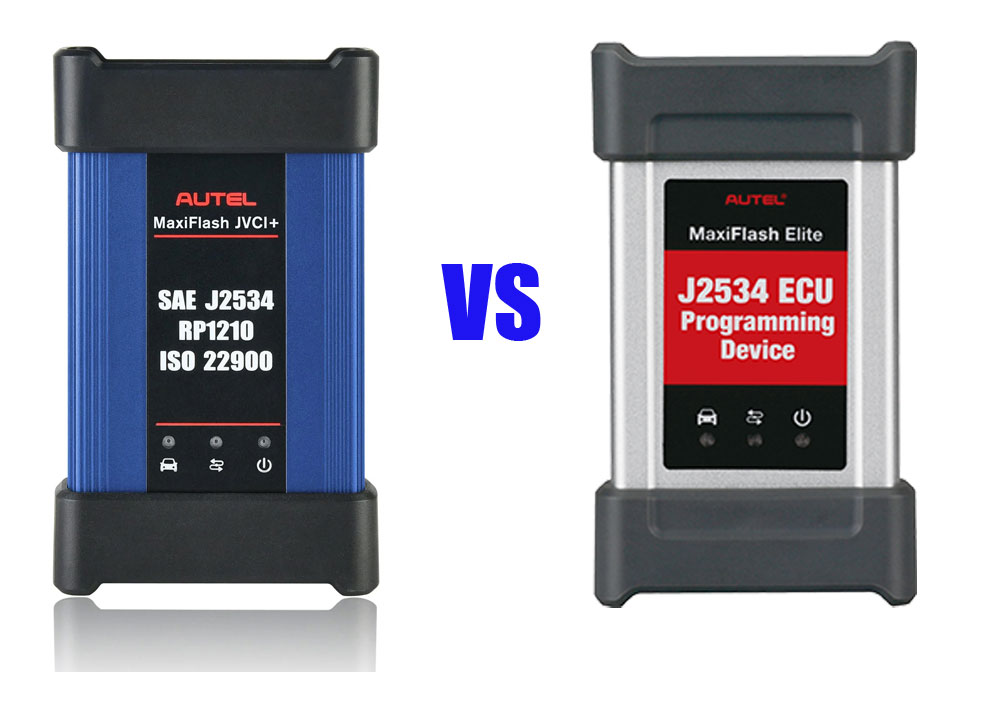
Autel MaxiFlash JVCI+ vs MaxiFlash J2534 Gray

 What’s the difference between the Autel MaxiFlash JVCI+ blue one and the MaxiFlash J2534 Elite silver one?

Autel MaxiFlash JVCI+ vs MaxiFlash J2534 Gray

These are the major differences:

1. The silver MaxiFlash J2534 Elite would come with a maxisys Elite, ms908 etc for diagnostic where the blue JVCI+ works for key programming and security codes.

2. The blue JVCI+ one is an updated version of the Grey/silver one. It works a lot better and faster. Compatible with the IM608 key scan tools but also works with the MS909 and MS919, or Ultras (ultras have a bigger and better version).


3. The jvci+ has DoIP and CAN FD built into the vci as the elite doesn’t not have CAN FD protocol.  Blue one supports CAN FD, the silver one doesn’t (needs an adapter).


4.

The J2534 Elite is not Bluetooth, the JVCI+ is. So that means the Elite plugs directly into the OBD port, the JVCI has a dongle. As J2534 passthroughs, they “should” operate with OEM software, etc.
Both do the same thing. While both are J2534-1 and J2534-2 compliant, these J2534 passthru will work with whichever model you are considering. GM, FCA, GM, etc.


When it comes to ECU programming/coding, we would trust a hardwired connection over wireless any day.


5. The gray J2534 box does not work with Techline Connect SPS anymore without a driver update.

The newer JVCI/JVCI+ box will work without driver update.


In sum:

If only considering its use as a J2534 pass-through device, the Autel JVCI+ is better.

Monday, February 26, 2024

Can I Use Autel J2534 with JLR Topix Cloud?

 Question 1: Can I use Autel VCI j2534 doip interface like the Maxiflash Elite with JLR Topix Cloud or need JLR SDD doip?

Question 2: Autel J2534 has anyone used with jlr pathfinder I have it working with sdd but know pathfinder need doip so not sure if it will work?


Here is the clue.

The J2534 thats comes with it will allow you to connect to the OEM software to do the programming.

If you are using an Autel J2534 device then first download and install Maxi PC Suite on your laptop. After that you need to register your device in that and then you will be able to connect JLR using Autel J2534.


If your J2534 does not have a DoIP protocol, it won’t be able to handle Pathfinder information.

DoIP stands for diagnostics over IP or diagnostics over internet protocol.

One of our clients has a J2534 that came with the IM608, but does not have DoIP protocol,  and it wouldn’t work on 2019 Land rover.
Just wasn’t communicating with the car.  His IM608 JVCI did not have the right protocol did not meet with the landrover specs.


Which Autel J2534 comes with DoIP protocol?

Autel VCI200

Autel VCMI that comes with MSUltra

Autel JVCI+ that comes with IM608 II

New Autel MaxiFlash VCI that comes with Elite II pro,

autel j2534 doip

If comes with JLR SDD, Autel J2534 works fine with JLR SDD. All good. Even programmed ECM completely several times and coded immo functions.
Just tested today.

I had got installed Maxi Suit. Installed JLR SDD 163, restarted and open software until asks for automatic vin detection. Plugged j2534 Autel on usb port, wait 30 seconds. Click on autovin detection and j2534 and interface was detected ok (software sends an error about ignition voltage, obviously because interface was not plugged on a car). Looks like all works perfectly.


If you need a cheaper alternative that works perfectly with JLR Topix Cloud, VNCI JLR DoIP is the best one to go.

VNCI JLR DoIP Topix Cloud Online Programming Confirmed!