Sunday, May 18, 2025

Autel Ikey 2020 Toyota Yaris Keyless Not Working Solution

 Problem:

I did an autel ikey for a 2020 Yaris Remote works and car only start when push button with key. I have replaced battery but keyless entry and start didn’t work.

the remote does work lock and unlock the car.
But keyless detection not work.
I tried different frequencies but didn’t program to the car.

Anyone had problem with autel key?

Autel Ikey 2020 Toyota Yaris Keyless Not Working 1

Autel Ikey 2020 Toyota Yaris Keyless Not Working 2

Solution:

Wrong frequency!
Change the frequency on the key should work.
Change the frequency in Autel setting.
Go to
Special functions.
Botton adjustment.


Report:
I did it and did work.

Tuesday, May 13, 2025

Autel IM608 Program VW Tiguan 2019 MQB48 Key via APB131

 In this article, we will walk through the process of adding a new key to a 2019 Volkswagen Tiguan (MQB platform). The original key was ordered but had not yet arrived, so the technician decided to extract the necessary data from the instrument cluster to program a new key. Additionally, the customer requested an extra non-original (Chinese) key as a backup.

Autel IM608 Program VW Tiguan 2019 MQB48 Key via APB131 1
Step 1: Removing the Instrument Cluster

The first step involved removing the instrument cluster (dashboard panel). Here’s how it was done:

  1. Disassembly – The panel is held in place by clips and two Torx screws. Carefully removed the clips and unscrewed the panel.

  2. Opening the Cluster – Once removed, the cluster was opened to access the internal components. Inside, a TMS70F35 chip was identified, which stores key-related data.

Cluster number: 5NA.920.891.C

Autel IM608 Program VW Tiguan 2019 MQB48 Key via APB131 2

Processor: D70F3539

Autel IM608 Program VW Tiguan 2019 MQB48 Key via APB131 3

Step 2: Extracting Key Data

To program a new key, we need to read the immobilizer data from cluster. This involved:

  • Soldering Connections – Solder wires to the instrument cluster’s circuit board to establish a connection for data extraction.

  • Reading the Data – Using Autel IM608 and APB131 adapter, the immobilizer data was read. This process took approximately 15 minutes.

Autel IM608 Program VW Tiguan 2019 MQB48 Key via APB131 4

Autel IM608 Program VW Tiguan 2019 MQB48 Key via APB131 5

Autel IM608 Program VW Tiguan 2019 MQB48 Key via APB131 6

Step 3: Programming the New Key

Once the data was extracted, the next step was programming:

  1. Original Key Preparation – The original key (when it arrived) would be programmed using the extracted data.

  2. Adding a Chinese Key (here use Xhorse XM38) – The customer requested an additional non-original key. The technician prepared it as a “dealer key” and programmed it into the system.

Autel IM608 Program VW Tiguan 2019 MQB48 Key via APB131 7
Autel IM608 Program VW Tiguan 2019 MQB48 Key via APB131 8

Key Calibration Process

  • The car’s system recognized two existing keys.

  • The new (Chinese) key was successfully calibrated and tested.

  • Both the original and the new key worked, though the Chinese key lacked remote start functionality, which the customer deemed unnecessary.

Conclusion

The process of adding a key to a 2019 Volkswagen Tiguan involves:

  1. Removing and accessing the instrument cluster.

  2. Extracting immobilizer data via soldering and software.

  3. Programming new keys (original or aftermarket).

Final Notes

  • Original vs. Aftermarket Keys – Original keys offer full functionality, while aftermarket keys may lack features like remote start.

Monday, May 12, 2025

Will Autel IM608 Program Add Polestar 2 Electric Car Key?

 Tips to add a spare key for Polestar 2 electric car.

Usually we do those cars mainly with Vida (same system as Volvo), but today we tested Autel, and it didn’t read the CEM (all options tried), same as last year we tested, some modules can be read, some no.

This particular one was SPC5748G with mask 0N78s. If you choose different it gives this message: failed to read data.

However key programming went fine with Autel IM608 if you read password with different programmers or order it.
Note:

While programming don’t put ignition on or ready to drive mode, otherwise programming will fail.
Emergency flash + open drives door is enough to meet the conditions.

Autel IM608 Program Add Polestar 2 Electric Car Key 1

Autel IM608 Program Add Polestar 2 Electric Car Key 2

Autel IM608 Program Add Polestar 2 Electric Car Key 3

Autel IM608 Program Add Polestar 2 Electric Car Key 4

Autel IM608 Program Add Polestar 2 Electric Car Key 5


Autel APB131 Failed to Read 2025 Nissan Sentra Pin Code Solution

 Problem:

Nissan Sentra 2025. HFM with 10193 CPU. Try to read pin code from dump with Autel IM608 and APB131 adapter, but failed.
Data read correctly, read 3 times, but reading pin failed.
What’s wrong?

Autel IM608 Failed to Read 2025 Nissan Sentra Pin  1

Autel IM608 Failed to Read 2025 Nissan Sentra Pin 2

Autel IM608 Failed to Read 2025 Nissan Sentra Pin 3

Autel IM608 Failed to Read 2025 Nissan Sentra Pin 4

To successfully read pin code form HFM dump, make sure:

1. Enable good network connection.

2. Update Autel Nissan software to latest version.

3. Double-check the wiring diagram and your connection.

4. Delete all file save. Restart device. Connect 12V adapter to XP400 pro. Read again. It will work. Try several times.

If done all above but still failed, use J2534 and Nissan consult online program 3 min done.


User feedback:
It was necessary to update Autel. After the update, the pin code was read and the key was programmed.

Sunday, May 11, 2025

Program Ford Mavericks 2020- Key by Autel IM508 or FDRS?

 How to add a smart key on a 2023 Ford Maverick?  What tool to do it?

It’s on the new Ford system.


Autel IM508/IM608:

No, it cannot.

Don’t see it on the Autel’s Ford List.

Tried 2020 Ford Maverick add key ( flipkey ) can’t access with im508 either.


FDRS:

Yes. 100% FDRS on the Mavericks.

Any Ford key that is HU198T is FDRS only as far as we have seen.


For example:
2023 Ford Maverick all key lost.
Done, with Autel JVCI+ J2534 and fdrs.
Under PCM on FDRS.

Program Ford Mavericks 2020- Key by FDRS 1

Program Ford Mavericks 2020- Key by FDRS 2


Tool to Program Renault Master III 2021 Key

 Search tool for add key on Renault Master 2021+ and vans based on Master 2020+ chassis.

With 5 different programmers, I wasn’t able to do anything.

with Autel IM608, Obdstar x300 dp plus, xhorse vvdi key tool plus, Lonsdor and old xtool pad 2, failed on all of them.

Obdstar showed 0 key in system and couldn’t do the add key.

What tool to add key Renault Master III?


Here is the clue:

Only Zed Full Plus, Abrites AVDI and Smart Pro will do.


Zedfull:

You can read the PIN with the sniffer if you have a working key. No need to read flash in that case.

One of our customer did 2 weeks ago add second key Master 2021 by Zed Full Plus by obd, no issue. It takes little bit time to reflash bcm to extract pin code.

Zed Full Plus cannot do Dacia cars with Marelli UCH for example, AVDI can.


AVDI:

I would take AVDI for Renault… Zed Full Plus cannot do Dacia cars with Marelli UCH for example… AVDI can.

The RR021 is a key programming solution, which works only by OBD and allows the following: Additional key programming ALL KEYS LOST Supported models: Renault Master III/Kangoo II 2016+ N.B.

But it is expensive.  € 4500 full Renault & Dacia key functions.


SmartPro:

Smart pro does the visteon system from 2020 to 2022.


OBDSTAR X300 Classic G3:

Latest Renault Master is 2010-2016. Nothing after.


Autel IM508/IM608:

Autel not possible. After update on January 2025 plenty of Renault are removed from list, well they are still on list but when you wanna do it something then say “Function not supported”.
Autel is banned/removed from renault online functions. On autel’s renault cars are still supported but only those cars what are not required renault online service.


Lonsdor K518 Pro:

LANDSOR is not well for Renault Maaters and Traffics especially where are lost key.

Wednesday, May 7, 2025

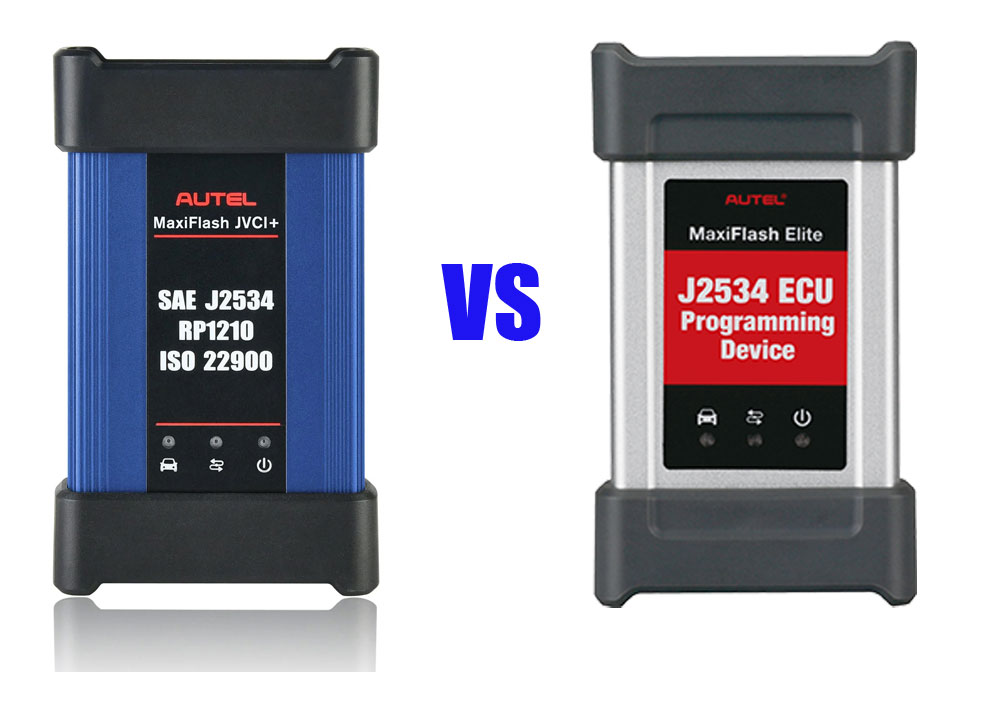
Autel MaxiFlash JVCI+ vs MaxiFlash J2534 Gray

 What’s the difference between the Autel MaxiFlash JVCI+ blue one and the MaxiFlash J2534 Elite silver one?

Autel MaxiFlash JVCI+ vs MaxiFlash J2534 Gray

These are the major differences:

1. The silver MaxiFlash J2534 Elite would come with a maxisys Elite, ms908 etc for diagnostic where the blue JVCI+ works for key programming and security codes.

2. The blue JVCI+ one is an updated version of the Grey/silver one. It works a lot better and faster. Compatible with the IM608 key scan tools but also works with the MS909 and MS919, or Ultras (ultras have a bigger and better version).


3. The jvci+ has DoIP and CAN FD built into the vci as the elite doesn’t not have CAN FD protocol.  Blue one supports CAN FD, the silver one doesn’t (needs an adapter).


4.

The J2534 Elite is not Bluetooth, the JVCI+ is. So that means the Elite plugs directly into the OBD port, the JVCI has a dongle. As J2534 passthroughs, they “should” operate with OEM software, etc.
Both do the same thing. While both are J2534-1 and J2534-2 compliant, these J2534 passthru will work with whichever model you are considering. GM, FCA, GM, etc.


When it comes to ECU programming/coding, we would trust a hardwired connection over wireless any day.


5. The gray J2534 box does not work with Techline Connect SPS anymore without a driver update.

The newer JVCI/JVCI+ box will work without driver update.


In sum:

If only considering its use as a J2534 pass-through device, the Autel JVCI+ is better.