Wednesday, April 22, 2020

Autel IM608 Program Dodge RAM 3500 2016 All Keys Lost

How to use Autel MaxiIM IM608 to program an all keys lost scenario on a 2016 Dodge Ram 3500.

Main steps:
Immo status scan
Erase keys and get pin code
Key learning

1) Immo Status Scan
autel-im608-dodge-ram-3500-akl-1

Turn the ignition on
Read and erase existing fault codes
autel-im608-dodge-ram-3500-akl-2

autel-im608-dodge-ram-3500-akl-3


2)
Press Read Pin Code
autel-im608-dodge-ram-3500-akl-4

Turn ignition off and turn on emergency flashers, press OK
autel-im608-dodge-ram-3500-akl-5

Read 4-digit pin code success
3)
Select Key Learning-> Erase Key
autel-im608-dodge-ram-3500-akl-6

Press OK to erase all keys
autel-im608-dodge-ram-3500-akl-7

Turn ignition off and turn on emergency flashers, press OK
autel-im608-dodge-ram-3500-akl-8

All keys have been erased.
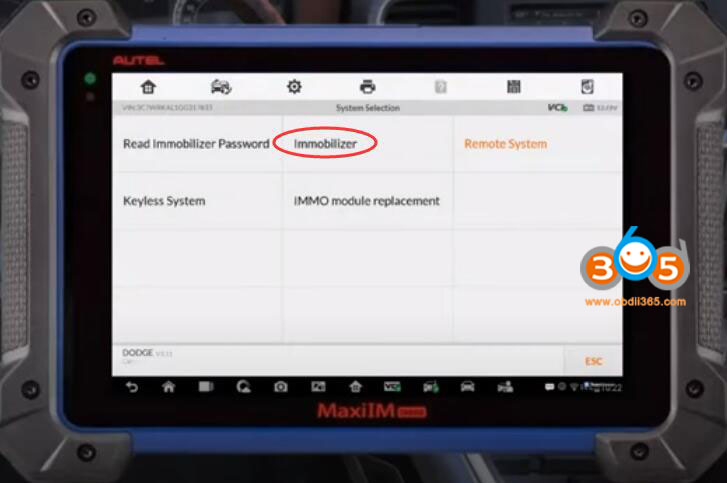
Select System selection->Immobilizer->Immobilizer CAN
autel-im608-dodge-ram-3500-akl-9

autel-im608-dodge-ram-3500-akl-10


Turn the ignition on
Choose Key Learning
autel-im608-dodge-ram-3500-akl-11

Make sure all keys have been erased before learning key. Plae an unprogrammed FOBIK key into the ignition. The ignition should be in the LOCK position.
autel-im608-dodge-ram-3500-akl-12

Autel IM608 learning key in process
autel-im608-dodge-ram-3500-akl-13

Key learning success.
Done.

http://www.key-programmer.org/2020/04/22/program-ram-3500-2016-all-keys-lost-with-autel-im608/


Saturday, April 18, 2020

Autel IM608 Reset Honda Accord 2010 Key

How to use Autel MaxiIM IM508/IM608 to reset key on a Honda Accord year 2010.

Select IMMO function->Auto VIN->Manual Selection->Accord->Blade Key->Immobilizer(Honda)

autel-im608-reset-honda-accord-key-1

autel-im608-reset-honda-accord-key-2

autel-im608-reset-honda-accord-key-3

autel-im608-reset-honda-accord-key-4


Turn the ignition off.
Identify it is 4th generation immobilizer.
Select Key->Reset Key
autel-im608-reset-honda-accord-key-5

autel-im608-reset-honda-accord-key-6


The registration or the clearance of the key will be recorded by this function.
At least one registered key is required to reset all key steps.
autel-im608-reset-honda-accord-key-7

Insert a registered key and turn on the ignition.
Enter number of keys to be reset
autel-im608-reset-honda-accord-key-8

Turn the ignition off.
Turn the ignition on.
Turn the ignition off within 20s.
Turn the ignition on using another key within 20s.
autel-im608-reset-honda-accord-key-9

Turn the ignition off within 20s.
Turn the ignition on using the same key within 20s.
autel-im608-reset-honda-accord-key-10

Turn the ignition off.
Turn the ignition on.
Check if the immobilizer indicator lamp goes out.
If yes, Turn the ignition off.
Turn the ignition on using a registered key.
The registration of the key is completed. Turn the ignition off.
autel-im608-reset-honda-accord-key-11

Check all keys to ensure that all of them can start the engine.

http://www.obdii365.com/wholesale/autel-im608--key-programmer-apb112-GBOX2.html

Friday, April 3, 2020

Autel IM608 Program Range Rover Sport 2012 All Keys Lost

Vehicle model: Land Rover Range Rover Sport 2012
Scenario: All Keys Lost
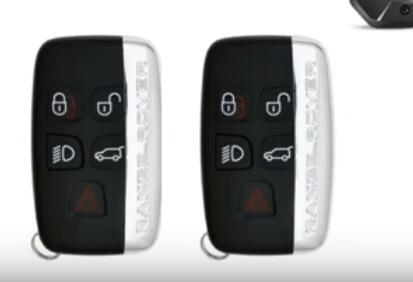
Key type: 5-button smart key
What you need:
Autel MaxiIM IM608 and XP400 programmer
2 smart keys
autel-im608-program-range-rover-2012-akl-1

Procedure:
autel-im608-program-range-rover-2012-akl-2

Read BCM data on bench mode (xp400 is required)
Select Immo Status Scan
autel-im608-program-range-rover-2012-akl-3

Press Start button
autel-im608-program-range-rover-2012-akl-4

Connect USB cable and turn off bluetooth
autel-im608-program-range-rover-2012-akl-5

Read and erase error codes
Click Key Learning "Keyless System (CAN)"->All smart keys lost
autel-im608-program-range-rover-2012-akl-6

Press Start button
Turn ignition off
autel-im608-program-range-rover-2012-akl-7

Identify vehicle information
autel-im608-program-range-rover-2012-akl-8

Identify 00 number of key
autel-im608-program-range-rover-2012-akl-9

All smart keys were erased. Follow prompts to learn new smart keys.
Put the learning smart key on your hand
autel-im608-program-range-rover-2012-akl-10

Press Unlock button of the smart key be learned for 1s within 5s. if the vehicle does not respond,  try a few more times
autel-im608-program-range-rover-2012-akl-11

Learn 1st key succeed, learn next key
Repeat process with second key
Then click Finish.
Test new smart keys.
Done.

http://www.obdii365.com/wholesale/autel-im608--key-programmer-apb112-GBOX2.html

Tuesday, March 31, 2020

Autel G Box 1 vs. G Box 2 Adapter

The Autel G-BOX is an adapter compatible with Autel IM508 (with Purchase of XP400 programmer) and IM608 Key Programming tablets used to aide in the programming keys for Mercedes DAS3 CAN EIS/EXS in an ALL Keys Lost situation. The G-Box2 also supports DME/DDE ISN Reading and Writing in Boot Mode on applicable BMW vehicles.  Bench Method is also supported. All Keys Lost password calculations are 4x to 8x faster. Moreover, the number of insertions and removals of W216 and W164 EISs after the year 2009 is reduced to zero, greatly simplifying the operation steps. It can be used in Boot Mode or Bench Method. G-BOX2 needs to be used with the Autel IM508 or IM608 for reliable performance.

Less Time, More Secure!
  • Supports fast mode on vehicle and bench when all keys of Mercedes-Benz vehicles using the DAS3 EIS/EZS are lost.
  • Reads and writes Bosch engine ECU on F chassis of BMW and MQB of Volkswagen.
1. Mercedes DAS3 add keys and all keys lost on bench. (both g box 1 and g box 2)
2. Mercedes DAS3 all keys lost on vehicle. (both)
3. Read engine control module password by boot. (both)
4. Read Bosch ME/MED/MEVD/EDC 17 Engine control module password on the bench. (G-BOX2 only)


Tuesday, March 24, 2020

Autel IM608 Program Toyota Sienta 2016+ All Smart Key Lost

How-to: program Toyota SIENTA 2016 all smart key lost and generate simulator key with Autel IM608 and APB112 emulator by OBD.

Model: Toyota Sienta 2016+

Lost all keys, cannot turn on
autel-im608-toyota-sienta-2016-akl-1

Device required:
Autel MaxiIM IM608 & XP400
APB112 emulator
new smart key


Procedure:
Step 1: Backup IMMO data
Connect IM608 VCI and APB112 emulator
Select IMMO->Toyota->Manual Selection->Other->SIENTA->Smart Key->Keyless System (CAN) ->Backup Immobilizer Data
autel-im608-toyota-sienta-2016-akl-2

autel-im608-toyota-sienta-2016-akl-3

autel-im608-toyota-sienta-2016-akl-4

autel-im608-toyota-sienta-2016-akl-5

autel-im608-toyota-sienta-2016-akl-6

autel-im608-toyota-sienta-2016-akl-7

autel-im608-toyota-sienta-2016-akl-8


The function is used to backup the EEPROM data of the smart box of the vehicle.
autel-im608-toyota-sienta-2016-akl-9

The data can be used to generate the simulator key for emergency start of the vehicle to perform the key matching function.
Must enable network connection
autel-im608-toyota-sienta-2016-akl-10

Read immo data in progress
autel-im608-toyota-sienta-2016-akl-11

Save backup file.
Backup succeed.


Step 2: Generate simulator key
autel-im608-toyota-sienta-2016-akl-12

Select Generate Simulator Key
autel-im608-toyota-sienta-2016-akl-13

Select the EEPROM data saved in Step 1.
Retrieving critical data to generate simulator key
autel-im608-toyota-sienta-2016-akl-14

Key type: SLK-03
autel-im608-toyota-sienta-2016-akl-15

Connect APB112 key simulator via USB cable
autel-im608-toyota-sienta-2016-akl-16

Identify APB112 software
The simulator key is generated successfully.
autel-im608-toyota-sienta-2016-akl-17

The simulator key can be used to turn the ignition on in case of emergency to learn the key.
autel-im608-toyota-sienta-2016-akl-18

The key can turn on and start vehicle now.

Step 3: Learn new smart key
Use the simulator key to learn new original smart key
autel-im608-toyota-sienta-2016-akl-19

Choose Add Smart Key menu and follow Autel IM608 prompts to add new original smart remote until succeed.

www.obdii365.com

 http://www.key-programmer.org/2020/03/24/program-toyota-sienta-2016-all-smart-key-lost-with-autel-im608/