Monday, December 2, 2024

Clone Benz 7G Tronic TCU with Autel IM508 Godiag GT107

 Tutorial: How to renew and clone Mercedes Benz 7G Tronic transmission gearbox TCU with Autel step-by-step.


It is a 2010 Mercedes GLK350, the shop just replaced the 7-speed automatic transmission with the used one. What we are going to be doing is cloning the TCU now over here on the ground.
Got Autel IM508 or IM608 connected with the XP400 then over the OBD plug.

Clone Benz 7G Tronic TCU with Autel IM508 Godiag GT107 1

This is the Godiag GT105 along with this GT107 transmission adapter. It is a great tool to use for these makes.
It is really easy to set up and we’ve got the power coming in that cable is connected to the jump pack using the alligator clips to connect the cable.

Clone Benz 7G Tronic TCU with Autel IM508 Godiag GT107 2

In IM508, go into TCU tools you can start by clicking the wiring diagram.
It will show you how to connect. We’ve got a little diagram that shows you where to connect the power, the ground, CAN high, CAN low.

Clone Benz 7G Tronic TCU with Autel IM508 Godiag GT107 3Clone Benz 7G Tronic TCU with Autel IM508 Godiag GT107 4

It does want us to put a 120 ohm resistor between the CAN H and CAN L. Now the nice thing about the godiag is that it actually has a little 120 ohm resistor. You just push this little button whenever you want to set it. That’s we are all set up.

Clone Benz 7G Tronic TCU with Autel IM508 Godiag GT107 5

We are going to start by reading the TCU data.
We have our VIN number,all of TCU information including key information.
Save this file.

Clone Benz 7G Tronic TCU with Autel IM508 Godiag GT107 6

Go ahead and back up the coding.
Our coding is now backed up.
We can save the file.

Clone Benz 7G Tronic TCU with Autel IM508 Godiag GT107 7
Let’s go ahead and connect all of this to the donor transmission in the car in the same way that we were connected to the original one.
We have OBD cable connected to our godiag and the leads for the godiag are connected to the transmission plug.

Clone Benz 7G Tronic TCU with Autel IM508 Godiag GT107 8Clone Benz 7G Tronic TCU with Autel IM508 Godiag GT107 9

We’re connected just like the diagram on the Autel shows us.

We are going to start by backing up the data from the donor module again. There’s our VIN number but this is the one from the donor car.

Clone Benz 7G Tronic TCU with Autel IM508 Godiag GT107 10

Go ahead and save it. Now that we have that backed up, let’s go ahead and renew TCU.

Clone Benz 7G Tronic TCU with Autel IM508 Godiag GT107 11

Press Yes to obtain an erase password. It succeeded in calculating the password. Here is the erase password.

Clone Benz 7G Tronic TCU with Autel IM508 Godiag GT107 12

Clone Benz 7G Tronic TCU with Autel IM508 Godiag GT107 13

We can now proceed with renewing this TCU. We have successfully renewed the TCU.

Clone Benz 7G Tronic TCU with Autel IM508 Godiag GT107 14

Now we can go ahead and write the TCU data from the original over to the donor.

Let’s click Write TCU. Select the file we read from the original transmission earlier. Writing succeeded.

Clone Benz 7G Tronic TCU with Autel IM508 Godiag GT107 15

Clone Benz 7G Tronic TCU with Autel IM508 Godiag GT107 16

Next we will write the coding. Select the file that we read earlier from the original transmission, enter the VIN number.

Writing of coding is completed.

Clone Benz 7G Tronic TCU with Autel IM508 Godiag GT107 17

Clone Benz 7G Tronic TCU with Autel IM508 Godiag GT107 18

Now let’s go back and read TCU data to make sure that it wrote the VIN number.

Our VIN number for the donor module is still there so we’re going to have to manually write that in.

Clone Benz 7G Tronic TCU with Autel IM508 Godiag GT107 19

So at the main menu we’re going to hit Write VIN, enter the VIN number hit okay. Writing of VIN number has succeeded.

Clone Benz 7G Tronic TCU with Autel IM508 Godiag GT107 20

Clone Benz 7G Tronic TCU with Autel IM508 Godiag GT107 21

Now we can go back and read TCU data again and this time we’ll make sure that our VIN number has been changed.

We might still have to active this TCM because here it is showing No activated.

Clone Benz 7G Tronic TCU with Autel IM508 Godiag GT107 22

Let’s go ahead and hit Activate TCU. Activating transmission succeeded.

Clone Benz 7G Tronic TCU with Autel IM508 Godiag GT107 23

Read TCU data again. The TCU has been activated. Let’s remove our cable, reconnect the connector.

Clone Benz 7G Tronic TCU with Autel IM508 Godiag GT107 24

This transmission is now ready to roll.  That’s how you clone the Mercedes 7G tronic transmission gearbox TCU using Autel IM508 and godiag adapter.


http://blog.obdii365.com/2024/12/02/autel-im508-clone-benz-7g-tronic-gearbox-tcu-with-godiag-gt107/

Wednesday, November 20, 2024

How to Solve Autel IM608 II “Update GBOX Error”?

 Problem:

When I was using Autel IM608 II to program BMW and trying to update the G-BOX3, it failed and prompted:

“Update GBOX error! Press OK to retry. Otherwise, press Cancel.”

Here’s the error page, any ideas?

Autel IM608 II “Update GBOX Error 1

Solution

1. Power off and power on the Autel G-BOX3 again, reconnect the cables & engine module for reading more times. Try a few more times.

2. If the step1 does not work, please upload the data log for help.

Autel IM608 II “Update GBOX Error 2

Thursday, November 14, 2024

Autel IM508 Read Audi BCM2 Encrypted IMMO Data via APB131

 Here obdii365.com takes you through the process of making keys for an Audi when all keys are lost using the Autel IM508/IM608 with the XP400 and the new APB131 adapter.

This is an Audi A5 2013. It is all keys lost. This BCM is encrypted. This is going to require the removal of the BCM2 in order to obtain the immo data.


Remove the BCM from the vehicle, open it up soldering to the contacts on the board, read the BCM immo data using that data to generate dealer key, then reinstalling the BCM back into the vehicle, after that learn key via obd.


Check the detailed procedure:

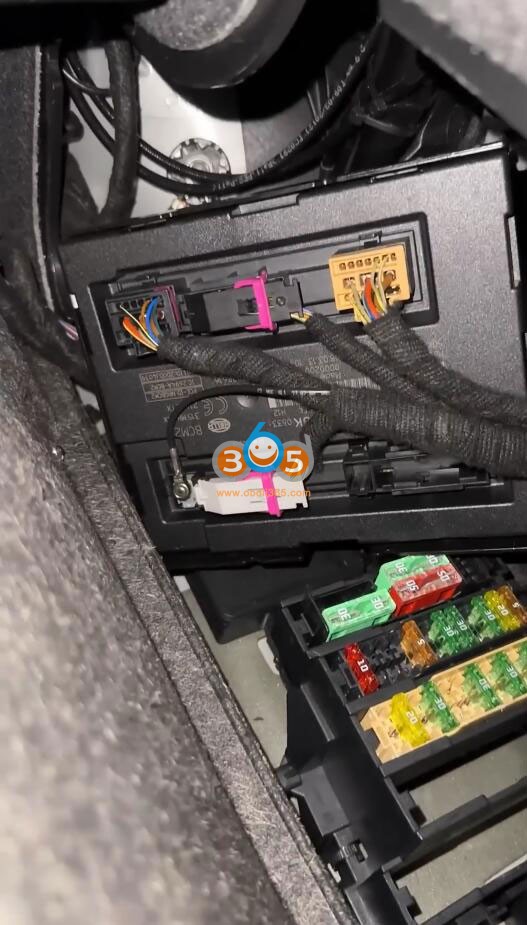
Get the BCM2 out of the trunk. It is located back here inside the wheel.

Autel IM508 Read Audi BCM2 Encrypted IMMO Data via APB131 1

Autel IM508 Read Audi BCM2 Encrypted IMMO Data via APB131 2

Disassemble the BCM2 module and put it on table.

Autel IM508 Read Audi BCM2 Encrypted IMMO Data via APB131 3

We will read the immo data with APB131 adapter. This adapter is not required to read this BCM however it does make the job a little bit easier.

*If without APB131 adapter, you can read BCM2 encrypted immo data with Gbox 2/3. It is more complex than apb131. Check: Audi BCM2 encrypted Gbox procedure.


Then we select V860 locked (dump). The chip type is going to be the D70F3634 that’s noted by the MCU or microprocessor.

Autel IM508 Read Audi BCM2 Encrypted IMMO Data via APB131 4

Autel IM508 Read Audi BCM2 Encrypted IMMO Data via APB131 5

Autel IM508 Read Audi BCM2 Encrypted IMMO Data via APB131 6
Hit Read chip data via programmer.

Autel IM508 Read Audi BCM2 Encrypted IMMO Data via APB131 7

Autel IM508 Read Audi BCM2 Encrypted IMMO Data via APB131 8

Autel gives us wiring diagram of how to set up our APB131.

Autel IM508 Read Audi BCM2 Encrypted IMMO Data via APB131 9

Connect the programmer with the APB131 adaper and the module with reference to the method shown in the figure.

Connect the programmer to the 12V DC power adapter check if the indicator light on the xp400 is green.
If the indicator light is red, check that xp400 pro is powered on before connecting to the apb131 adapter.

Autel IM508 Read Audi BCM2 Encrypted IMMO Data via APB131 10

We have got APB131 adapter soldered up.
It is reading data. It only took a couple minutes. Save the chip data.

Autel IM508 Read Audi BCM2 Encrypted IMMO Data via APB131 10

Autel IM508 Read Audi BCM2 Encrypted IMMO Data via APB131 11
Select Calculate IMMO data. Select the file we just saved.
Decoding success. Save immo data.

Autel IM508 Read Audi BCM2 Encrypted IMMO Data via APB131 12

We are going to generate dealer key. Select Load IMMO data.
There’s our CS code.

Autel IM508 Read Audi BCM2 Encrypted IMMO Data via APB131 13
Then select Make Dealer Key.
Insert key to be programmed into the xp400 pro programmer.
Generated dealer key success.

Autel IM508 Read Audi BCM2 Encrypted IMMO Data via APB131 14

Autel IM508 Read Audi BCM2 Encrypted IMMO Data via APB131 15

Autel IM508 Read Audi BCM2 EnAutel IM508 Read Audi BCM2 Encrypted IMMO Data via APB131 16crypted IMMO Data via APB131 11
We are back over at car and installing the BCM2 module back to vehicle.

Then start the process of key learning.
Select Key Learning.
The number of keys we want to learn is going to be 2.

Autel IM508 Read Audi BCM2 Encrypted IMMO Data via APB131 17

Autel IM508 Read Audi BCM2 Encrypted IMMO Data via APB131 18

Stick the key into the slot. Now Autel IM508 wants us to input the CS code.

Autel IM508 Read Audi BCM2 Encrypted IMMO Data via APB131 19
We’ve got the CS code type in.

Autel IM508 Read Audi BCM2 Encrypted IMMO Data via APB131 20
Hit okay. Then place each key to be learned in the key sensing area.
Pull the key out.
Then we put our second key in. You can hear the steering unlock.
Key learning process completed.

Autel IM508 Read Audi BCM2 Encrypted IMMO Data via APB131 21

Autel IM508 Read Audi BCM2 Encrypted IMMO Data via APB131 22

Done.

Wednesday, November 13, 2024

Autel IM608 Repair BMW FRM3 without Coding Afterwards

 We already how to repair a BMW FRM module using Autel IM608 XP400 in the past. But it is a manual way. Today we will show a new method to repair BMW FRM Footwell module with Autel without coding/programming afterwards.

Check the detailed guide to repair FRM through manual way.

How to Repair BMW FRM3 Module with Autel IM608?

The downside of the manual way is that:

It will bring FRM back to life is then writeable either by writing a file through a programmer or installing in the vehicle and doing actual programming via OBD. 
There is a issue that when it does the repair it basically leaves it prop to this actual vehicle VIN and that it came out of. You will install it and you will get the operation back as far as like lights and windows but it won’t be 100% correct because it is not coded to that car. or the eeprom is not for that specific car.
So you get basically in improper window operations is the biggest sign. You will hit your window switch for the driver’s door and the passenger window will go down and vice versa.
So it works but just acts funky, not correct. You rectify it by programming and because of that it just adds one extra step to the whole procedure of performing this repair.  The Autel now has the option to do it.


Let’s do the another way ( automatic way).

Here is a FRM3 module out of a BME E90. We will show how to use the Autel IM608 to repair a corrupted FRM control unit out of a BMW or MINI. The difference with this is that with this procedure you will not have to perform programming or coding after repairing it like you used to have to in the past.

Autel IM608 Repair BMW FRM3 without Coding Afterwards 1

You can basically do like a one click type of repair for the FRM like other programmers.

We already connected the FRM module with XP400 pro.

Autel IM608 Repair BMW FRM3 without Coding Afterwards 2

Here is the menu path:
Programmer-> Chip Reading/Writing-> Body Repair->BMW
There is only BMW because it’s targeted to FRM module.

Autel IM608 Repair BMW FRM3 without Coding Afterwards 3

Autel IM608 Repair BMW FRM3 without Coding Afterwards 4

Check your FRM label and make sure you pull up the correct option
Here choose FRM E90/E91 BASIS LED XEQ384 3M25J.

Autel IM608 Repair BMW FRM3 without Coding Afterwards 5

Performing this function will automatically partition the chip and overwrite the original data for recovery.

Autel IM608 Repair BMW FRM3 without Coding Afterwards 6
Hit Start

Autel IM608 Repair BMW FRM3 without Coding Afterwards 7

Before we doing this we need wipe out the eeprom kind of blank it out get the corruption gone out of there that way it is able to accept new data after being basically repaired or
wiped out. That is the only way these methods will work.

Through the manual way you have to do the write partition set up your settings for the chip, it will wipe it out and write it all, make it blank that way you can program it.

If you do this body repair, it will do it all for you. It will change the settings.

Autel IM608 Repair BMW FRM3 without Coding Afterwards 8

Autel IM608 Repair BMW FRM3 without Coding Afterwards 9

Autel IM608 Repair BMW FRM3 without Coding Afterwards 10

Save this data, and name it repaired file.
Continue working, Autel is recovering chip.

Autel IM608 Repair BMW FRM3 without Coding Afterwards 11

Autel IM608 Repair BMW FRM3 without Coding Afterwards 12
Then you will get an uncupported FRM.

Go back to manual way and read EEPROM again, this time it will read EEPROM.
You have a fixed FRM that can you throw back in the car. Save the eeprom data.

Autel IM608 Repair BMW FRM3 without Coding Afterwards 13

Open HexEditor and find the VIN data.
The FRM keeps mileage and also VIN number why you get a manipulation dot if you throw a used one in there.

Autel IM608 Repair BMW FRM3 without Coding Afterwards 14

Then you can connect a USB disk to IM608 and export fixed FRM data to PC.

Autel IM608 Repair BMW FRM3 without Coding Afterwards 15
Run PC, visit FRM3 D-flash to EEPROM converter website http://tlvps.tomvanleeuwen.nl/frm/
Follow the instructions.
Upload D-flash data.
This basically fixes it turns it into a usable eeprom.

Autel IM608 Repair BMW FRM3 without Coding Afterwards 16

Autel IM608 Repair BMW FRM3 without Coding Afterwards 17

With that original vehicle’s FRM VIN number and coding.
It basically ends up fixing and converting it into an eeprom.
It give us VIN number so on and so forth,
You hit download and download eeprom onto your computer.
Back onto your drive move it over to the Autel and write to the FRM module.

Go back to EEPROM option
Write it back to the eeprom not the Dflash.

Autel IM608 Repair BMW FRM3 without Coding Afterwards 18

Autel IM608 Repair BMW FRM3 without Coding Afterwards 19

Then install FRM module back to vehicle without programming afterwards.


www.obdii365.com