Thursday, September 19, 2019

Autel IM608 adds BMW F10 CAS4 Smart Remote via OBD

Autel MaxiIM IM608 adds BMW CAS4/CAS4+ all series OBD programming  (add key & all keys lost) in June 2019.
Make sure your Autel IM608 has registered with XP400 programmer adapter.

Here’s a demo example on CAS4 via OBD thought Smart Mode
Model: BMW 528i 2015 F10 CAS4+
smart key chip: Hitag Pro 49
add new smart remote via OBD
autel-im608-bmw-cas4-via-obd-1
Left: new key     Right: original key

Procedure:
Turn on ignition
Connect MaxiFlash JVCI to IM608 by USB to OBDII
Connect XP400 via USB port
connect-im608-j2534-vci

connect-xp400-programmer

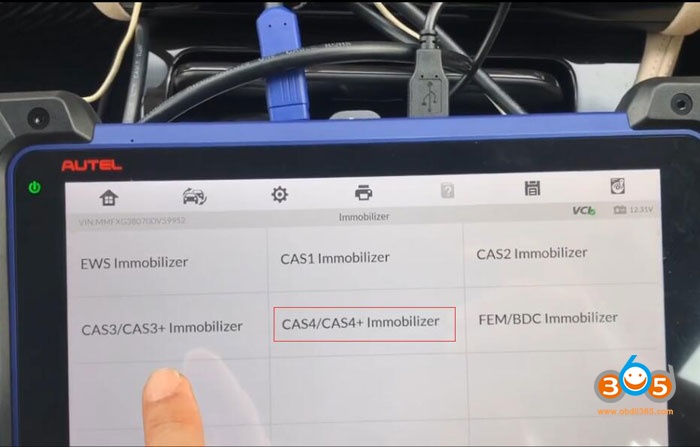
In MaxiIM Im608, Select IMMO->BMW->Smart Mode
autel-im608-bmw-cas4-via-obd-2

IM608 detects immobilizer system: CAS4/CAS4+
Show immobilizer box, DME and EGS
autel-im608-bmw-cas4-via-obd-3

Try to delete all fault code by clear code operation
autel-im608-bmw-cas4-via-obd-4

autel-im608-bmw-cas4-via-obd-5

autel-im608-bmw-cas4-via-obd-6

Delete fault code on CAS4 and DME
autel-im608-bmw-cas4-via-obd-7

Select Key Learning->See all vehicle information/ecu information->Key Learning by OBD
autel-im608-bmw-cas4-via-obd-8
autel-im608-bmw-cas4-via-obd-9
autel-im608-bmw-cas4-via-obd-10

Follow instruction below to operate
Read SK or load SK ->Write Key
autel-im608-bmw-cas4-via-obd-11
Key number: position used key 1, 2, 4 to try to program free key3
autel-im608-bmw-cas4-via-obd-12

Press OBD read SK
This process requires networking to obtain data, set up the network to ensure that it is connected to WIFI and keep this state during the whole process.
Reading information about current ECU…
autel-im608-bmw-cas4-via-obd-13
This current software version is not supported need to upgrade first before read SK.
Execute upgrade with the Autel IM608 System Mode->CAS4/CAS4+ Immobilizer System->Programming Operation->ECU Upgrade
autel-im608-bmw-cas4-via-obd-14
autel-im608-bmw-cas4-via-obd-15
autel-im608-bmw-cas4-via-obd-16

This process requires network connection as well.
Wait 7-8 minutes, Don’t touch any buttons of vehicle
Dashboard will normally be off and on
autel-im608-bmw-cas4-via-obd-17

After 7-8 minutes ECU upgrade successfully
autel-im608-bmw-cas4-via-obd-18

Go back to read SK by OBD
autel-im608-bmw-cas4-via-obd-19
Read SK needs program, and make sure the voltage is over 13V and stable.
Require network connection to obtain data.
Download files
autel-im608-bmw-cas4-via-obd-20

Download to programming file completed
Fine SK process time around 10 minutes
Dashboard will normally be off and on
autel-im608-bmw-cas4-via-obd-21

Do you have working key? Yes
autel-im608-bmw-cas4-via-obd-22

Put a working key to start coil as close as possible.
autel-im608-bmw-cas4-via-obd-23

Now got SK password
Input secret key->select immo ECU type CAS4+
autel-im608-bmw-cas4-via-obd-24

autel-im608-bmw-cas4-via-obd-25

autel-im608-bmw-cas4-via-obd-26

Fill all SK
Enter the secret successfully. Execute “Write Key” function
Choose key position 3 and Write new key
autel-im608-bmw-cas4-via-obd-27
If key learning successful, but there is no remote control, add one more key, the remote control of the second key will work normally.
autel-im608-bmw-cas4-via-obd-28

Put new key close to the Start coil. Ket frequency: 315Mhz
autel-im608-bmw-cas4-via-obd-29

Key learning in process
autel-im608-bmw-cas4-via-obd-30

Write key successful
Put the key close to start induction coil, press and hold the ignition for 10s, after the learning is completed, the key can be normally used.
autel-im608-bmw-cas4-via-obd-31

Key number 3 already used.
Test remote and start engine.
autel-im608-bmw-cas4-via-obd-32

autel-im608-bmw-cas4-via-obd-33

Done.

see also:
BMW CAS4/CAS4+ by OBD with VVDI2, BMW Explorer, or Autel

Tuesday, August 27, 2019

Autel IM608 Program Polo 2015 MQB Key Success

Feedback:
Polo 2015 mqb done with Autel MaxiIM IM608.
The mqb key is not original but it goes very well. You can use original mqb key but they are very expensive.

Picture attached:
autel-im608-polo-2015-mqb-1

autel-im608-polo-2015-mqb-2


Monday, August 26, 2019

How to use Autel G Box for Benz All Keys Lost?

What is Autel G box:
autel-g-box
It’s a new adapter to works for Auetl MaxiIM IM608 and IM508 with XP400 adapter (also works with Aurodiag IM600 and IM100)

The G-box features:
  • Used for Mercedes all keys lost and password calculation (much faster)
  • Used for Mercedes ECU data and EIS password calculation (much faster)
  • Mercedes DAS3 can EIS/EZS all keys lost
  • Save time to read W204 ECU data & W207 EIS by over 85%
  • No need to remove and reinsert the key for W221 & W164 after 2009
  • Help read and write BMW DME/DDE ISN in boot mode

When you need Autel G-box:
It’s required when you do all keys lost for Mercedes or BMW.
autel-g-box-benz-w164-w251-akl
  1. Mercedes all keys lost – faster password calculation
-8x times faster password calculation for EIS W172, W204, W207
-4x times faster password calculation for EIS W209, W211, etc.
  1. Mercedes all keys lost – no more repeated insertions and removables of ir simulator
W164/-208, W251/-2008, W164/2009-, W169, W251/2009, W216, W221 (partial), W202 (K)/ W208 (K)/ W210 (K), W203 (K)/ W463 (K)
  1. Mercedes all keys lost – can be programmed on the vehicle without removing the EIS
Except for EIS W164/-2008, W251/-2008, W221, W202 (K)/ W208(K)/ W210 (K), and W203 (K)/ W463 (K), all other eis can be programmed on the vehicle directly
  1. Mercedes all keys lost, BMW DME/DDE ISN reading and writing in boot mode
23 categories of Bosch engine, including MEVD/EDC17
6 categories of Siemens/Continental engine, including MSD/MSV engine

How to use Autel G box:

You should know all the details (incl. ports and cables) before you use the G-box
autel-g-box-package-1

autel-g-box-package-2
There are two methods to use the G-box, OBDII or on table

method 1: OBDII operation when Mercedes lost all keys

the method is use for Mercedes W204, W207, W164, W216 EISs after year 2009
connect-autel-g-box-1
steps to connect to G-box:
  1. connect the G-box to the car thru OBD port
  2. remove the fuse of EIS on the vehicle
connect the relay ports to the fuse using the supplied fuse cable
  1. when the vehicle has an ELV, connect the K7 port and ELV plug using the supplied K-line cable
  2. connect the G-box to the Autel diagnostic tablet like MaxiIM IM608

method 2: operation on table when Mercedes lost all keys

the method is used for all Mercedes EIS that are already covered by Autel tablet
connect-autel-g-box-2

Sunday, August 18, 2019

Autel IM508 Program 2008 Jetta Megamos ID48 Key Success

Purpose: transponder key copy
Car model: VW Jetta
Car year: 2008
Transponder: Megamos ID48

autel-im508-2008-jetta-key-1

autel-im508-2008-jetta-key-2
Steps:
go to autel im508 immo system
autel-im508-2008-jetta-key-3
accept the disclaimer
go to im508 volkswagen software
autel-im508-2008-jetta-key-5
smart mode
autel-im508-2008-jetta-key-5
reading vehicle information
read out the vehicle
it’s jetta 2008
autel-im508-2008-jetta-key-6
information:
  1. megamos 48 key; #key blank
  2. “key learning” function will first start clear all working keys, then learn keys available.
“remote control learning” function will first clear all working remotes, then learn remotes available. before using these functions, pls ensure that all keys are prepared.
  1. “key add” function will add one key to existing key count.
“remote control add” function will add one remote to existing remote count. the customer can use there functions without all keys available.
autel-im508-2008-jetta-key-7
copy megamos 48 key:
step 1: read immo data
step 2: read and write key id
step 3: make a dealer key
autel-im508-2008-jetta-key-8
autel-im508-2008-jetta-key-9

autel-im508-2008-jetta-key-10

autel-im508-2008-jetta-key-11

autel-im508-2008-jetta-key-12

autel-im508-2008-jetta-key-13

autel-im508-2008-jetta-key-14

autel-im508-2008-jetta-key-15

autel-im508-2008-jetta-key-16

autel-im508-2008-jetta-key-17

autel-im508-2008-jetta-key-18
key copying success!
test the key on the car
autel-im508-2008-jetta-key-19

autel-im508-2008-jetta-key-20
the key is working!
job’s done!


Time: under 5 min
Result: success!

Conclusion:
Walk thru of the great feature built into the Autel IM508 and IM608 for cloning VW megamos id48 transponder keys.
Using the Scan tool you can clone a key ID to a new blank key saving time from pulling and decoding the PIN.
Everything can be done in under 5 Minutes. Volkswagen Audi Group.

Should I buy a XP400 Programmer for Autel IM508?

Is Autel MaxiIM im508 worth the money? What keys can you do with it?

From what I can see, the more expensive has more options for coding and special functions.
Relating to diagnostics.
IMMO seems to be the same on both. Maybe chip reading or eeprom writing. But I have yet to find a video to show something that the smaller and cheaper version doesn’t do that the expensive one does.

Regarding IMMO of course.
I would get the more expensive one, but my job has the VERUS, Autologic and Launch Torque.

So diagnostic wise, I’m covered. Which is why I purchased the Autel im508 for key programming. Which has worked so far. Older ford models and a Mazda. Some Chryslers, but nothing requiring the 5 digit PIN’s. Just the old 4 digit pin ones.

You should be cover with the IM508.
It has the same IMMO functions as the expensive one.

I have yet to try a newer Chevy. But I had a 2016 GMC truck and it had the ability to program keys. Just that it was going to erase all of them and program them all back. Not sure if that’s how it works on newer models. I thought they get programmed like Chrysler cars and you need a PIN to program them.

The old Ford models, programs them in 5 seconds. Meaning is does the 10 minute bypass. Which is awesome. Same with Toyota’s. I see the quick immo reset option, which usually takes a lot less than the 16 minute wait. Haven’t tried it yet, hopefully I can soon to test it out. But yeah, the cheaper tool is just as good as the expensive one. I would go for the cheaper one if it’s IMMO only you’re looking for.

Oh and BmW cas4 only when connected to XP400 adapter as well. I want to make bmw keys and Hyundai
xp400-programmer

(The adapter is for Benz and it looks like a Benz key and it connects to the scanner. You can also buy nust the x400 scanner if you really want to do cas4 bmw too. The software from the im508 & im608 are identical. No difference at all.)

I did a 2014 Passat. It was able to program the key and then the fob part. Not sure why it says it can’t do it? The key was an original key from VW. The customer who brought it to me said that the car was owned by someone who worked at a dealer, he purchased the key very cheap, but never programmed it. I followed the instructions of someone here on YouTube who did one as well. My machine error out after I did the process, but it still programmed it!  The fob part was very easy! The one thing most of these tools cannot do is “all keys lost”. For some reason, you have to do it through eeprom reading and writing. But if you have a working key, this tool can program 2014 cars. This one was a turn style key, not a proximity key. Haven’t seen anything about proximity key programming for VW or Audi.

Summary:
I love the Autel im508 if I didn’t have the Maxisys elite I might think of buying the im608, but I can do more with the elite and 508.